Knative KafkaChannel, Subscriptions, and SinkBinding
Build an event-driven pipeline with Knative KafkaChannel, Subscriptions, and SinkBinding. Compare channels with brokers and connect Python event producers.
In this post
Introduction
In one of my previous posts, I described a way to consume kafka messages using Knative on top of the Broker/Trigger pattern. Today, I would like to go a step further and describe a different way of building event-driven service using this beautiful open-source solution.
I want to share my experience building a fully event-driven service using Knative and KafkaChannel-based resources with SinkBinding. You can learn how to leverage these powerful tools to optimize data processing and streamline your architecture.
Differences between Channel with Subscription vs Broker with Trigger
Broker and Triggers are great for building flows as a routing-based model, where events are sent to one “bucket” called Broker, and then dispatched based on the Trigger logic (filters) to a specific target. This is great when you have lots of events that need to be sent to different consumers based on their categories (fields or sources). As with everything, it also has its downsides, in most cases, you want to have one single broker per namespace and use it as a sink for most of the topics that you need to source from. In this case, a broker might be too loaded, so maintaining it and its Kafka Topic can be problematic.
Channels and subscriptions are more suitable for implementing a linear type of flow, where you do not require any filtering of events and want to separate your processing “pipeline” from other parts of infra (each KafkaChannel will create its topic that it will maintain, of course, using a default configuration).
Motivation
Recently in my current project, I had to implement a single pipeline of events that were produced/consumed in my cluster. I already had my Broker/Trigger implementation used for other services that used KafkaSource to read messages stored in Apache Kafka and send them as CloudEvents to my sink (in this case my Kafka Broker Class).
First of all I didn’t need to use Kafka producer and events because this was totally a new flow, and there are no plans to have Kafka consumers for it in the future. I also wanted to separate this part of infra (messages) from one big shared Broker because it is already heavily used as well as I didn’t need any routing/filtering on my linear flow.
With that being said, I decided to use:
- Channel - as a sink for all my incoming events
- Subscriber - as a delivery mechanism between events from channel and my desired service where events should end up
- SinkBinding - as a way to inject a URL of the resolved sink into the Pod/Service template (as an environment variable), that I can produce CloudEvents from my Knative/Kubernetes services.
Implementation
Those steps already assumes you have knative eventing and Apache Kafka installed on your cluster.
Installation
Knative Channel (KafkaChannel) is not in standard knative-eventing package (at least at the version that is currently available) and needs to be installed additionally on your cluster.
- Eventing kafka controller:
kubectl apply -f https://github.com/knative-sandbox/eventing-kafka-broker/releases/download/knative-v1.9.1/eventing-kafka-controller.yaml - KafkaChannel:
kubectl apply -f https://github.com/knative-sandbox/eventing-kafka-broker/releases/download/knative-v1.9.1/eventing-kafka-channel.yaml
Consumer application
Knative Serving Service
apiVersion: serving.knative.dev/v1
kind: Service
metadata:
  name: my-knative-consumer-service
  namespace: default
spec:
  template:
    spec:
      containers:
      - image: docker.io/{username}/my-image
FastAPI app
import logging

from fastapi import FastAPI, Request, Response
from starlette import status

app = FastAPI()


@app.get("/")
async def root(request: Request):
    logging.info("This is my cloud event", body=await request.json())
    return Response(status_code=status.HTTP_204_NO_CONTENT)
Producer application
Knative Serving Service
apiVersion: serving.knative.dev/v1
kind: Service
metadata:
  name: my-knative-producer-app
  namespace: default
  labels:
    app: channeling-app
spec:
  template:
    spec:
      containers:
- image: docker.io/{username}/my-imageFastAPI app
import logging
import os

from cloudevents.pydantic import CloudEvent
from fastapi import FastAPI, Request, Response
from fastapi.encoders import jsonable_encoder
from starlette import status
import httpx

app = FastAPI()


@app.get("/api/whoever-call-me")
async def root(request: Request):
    cloud_event = CloudEvent(
         type="my_type",
         source="fastapi_consumer",
         data={"hello": "world"},
         partitionkey="my-partition-key",
    )
    url = os.environ["K_SINK"]  # NOTE: Auto injected by SinkBinding
    logging.info("Produced cloud event", url=url)
    async with httpx.AsyncClient() as client:
       await client.post(
           url,
           json=jsonable_encoder(cloud_event),
           headers={"content-type": "application/cloudevents+json"},
       )
    return Response(status_code=status.HTTP_204_NO_CONTENT)
Knative Channel ConfigMap
apiVersion: v1
kind: ConfigMap
metadata:
  name: kafka-channel-config
  namespace: knative-eventing
data:
  bootstrap.servers: "my-bootstrap-server-host:9092"
Knative Channel
apiVersion: messaging.knative.dev/v1
kind: Channel
metadata:
  name: my-channel
spec:
  channelTemplate:
    apiVersion: messaging.knative.dev/v1beta1
    kind: KafkaChannel
    spec:
      numPartitions: 3
      replicationFactor: 1
      config:
        apiVersion: v1
        kind: ConfigMap
name: kafka-channel-configKnative Subscription
apiVersion: messaging.knative.dev/v1
kind: Subscription
metadata:
  name: my-subscription
  namespace: default
spec:
  channel:
    apiVersion: messaging.knative.dev/v1
    kind: Channel
    name: my-channel
  subscriber:
    ref:
      apiVersion: serving.knative.dev/v1
      kind: Service
      name: my-knative-consumer-service
Knative SinkBinding
apiVersion: sources.knative.dev/v1
kind: SinkBinding
metadata:
  name: my-event-producer-service
spec:
  subject:
    apiVersion: serving.knative.dev/v1
    kind: Service
    selector:
      matchLabels:
        app: channeling-app
  sink:
    ref:
      apiVersion: messaging.knative.dev/v1
      kind: Channel
      name: my-channel
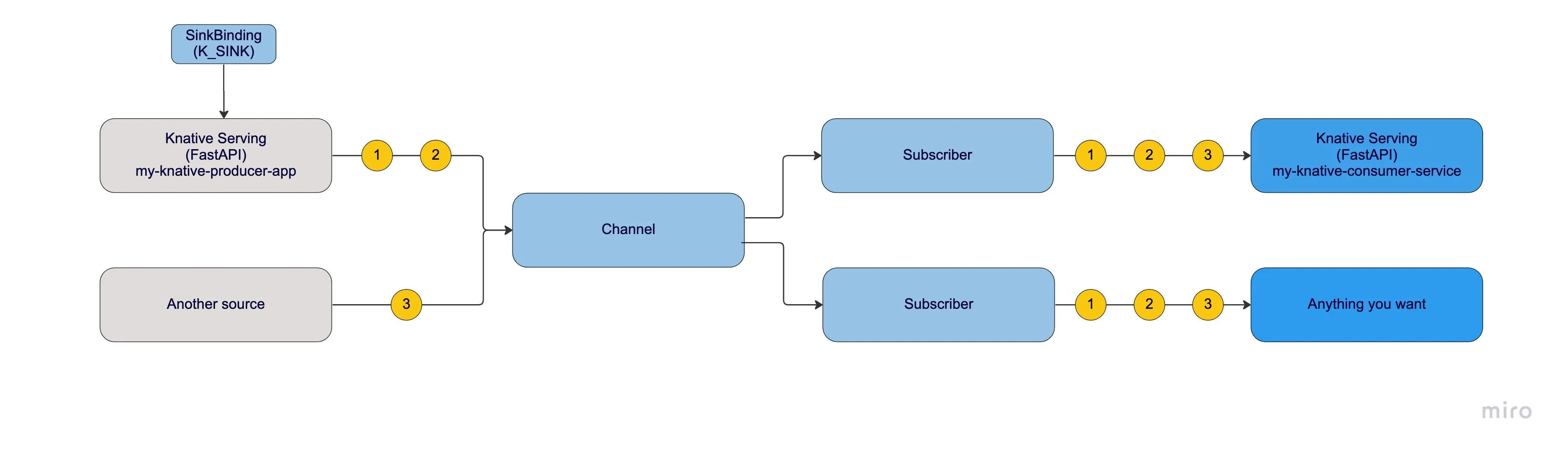
Flow description
The SinkBinding component injects the K_SINK environment variable, which contains the URL of the resolved sink (Channel), to the subject.
The subject is a Kubernetes resource that embeds a PodSpec template, such as a Knative Service, CronJob, or Deployment. In our example, the subject is the “my-knative-producer-app” application, which produces cloud events with specific JSON data and sends them to a Channel, the event destination.
The Channel uses a KafkaChannel to persist the event to a KafkaTopic (that was created by Knative). This flow ensures that events are reliably and efficiently delivered to subscribers.
Any Subscription created for this Channel will transport all events to services that will process them, in our example, the “my-knative-consumer-service”.
Lastly, a simple FastAPI app logs the received event and returns 204 HTTP status code without the content to let know the Subscriber that it was delivered successfully, otherwise, it might go to the dead letter sink if configured.
Summary
The decision of whether to use Knative Channels with Subscriptions or Broker Triggers depends on the specific requirements of your use case. If you require advanced filtering or routing capabilities, then Knative Channels with Subscriptions might be a better option. If you only need to trigger a single function or container in response to an event, then a Broker Trigger might be simpler and more straightforward.
I hope this example will help you at least with getting started with Knative or will give you some extra motivation to have a try in the next or current project.