Consume Kafka Events with Knative and FastAPI on Kubernetes
Build an event-driven Python service with FastAPI, Kafka, and Knative on Kubernetes. Configure Kafka sources, brokers, and triggers to route events.

Introduction
I would like to share my experience and workflow for setting up event-driven architecture using Knative.
Most of the recent applications I build nowadays heavily rely on Kafka and Kubernetes. In a very big shortcut, this ends up with a Producer that sends an event to the Topic and a while-loop that consumes this event. In Kafka either you configure auto-commit offsets of messages or manually commit after the message is consumed. In most cases, those while-loops are big processes that consume sync/async messages and are very hard to scale. To improve this process I would like to present and discuss Knative.
In this article, I will focus on Knative Broker (Kafka-source and sink) setup using Kafka as event source, FastAPI (Python) as web service and of course Kubernetes as a system for managing containerized applications across multiple hosts (Article assumes you already have a basic about Kafka and Kubernetes).
Knative
Knative is an Open-Source solution for building serverless and event-driven applications. Created by Google and passed over to a great team who continuously improves it. Software trusted by companies like vmware, Google, RedHat, IBM, and more. Considering current trends for microservices, Kubernetes, and event-driven approaches Knative might be a perfect choice for you.
Project is divided into two main modules: eventing and serving.
Knative eventing
It is a set of tools allowing you to use event-driven architecture to work with your applications. Thanks to many APIs it creates components to route event producers to event consumers (called later sinks). It uses standard HTTP POST requests to send those events between producer and sink. Later on, those sinks can be used as “buckets” from which events will be pushed to your applications via HTTP. Components that enable it are called Triggers, they can subscribe to a given service to the sink that events will be produced to and consumed by your application.
An application that we are referring to might be a simple web server e.g. k8s Deployment + Service or as in this case, Knative Service.
Knative serving
It is a set of objects (Kubernetes Custom Resource Definitions) used to define and control how your serverless workload behaves on the cluster. It takes full responsibility to set up, manage traffic, pods, scale, and Revision Kubernetes for you. Mostly used to avoid time-consuming ops resources, rapid development, autoscaling (including scaling to zero pods to save resources), and boring Kafka consumer loops.
Overview
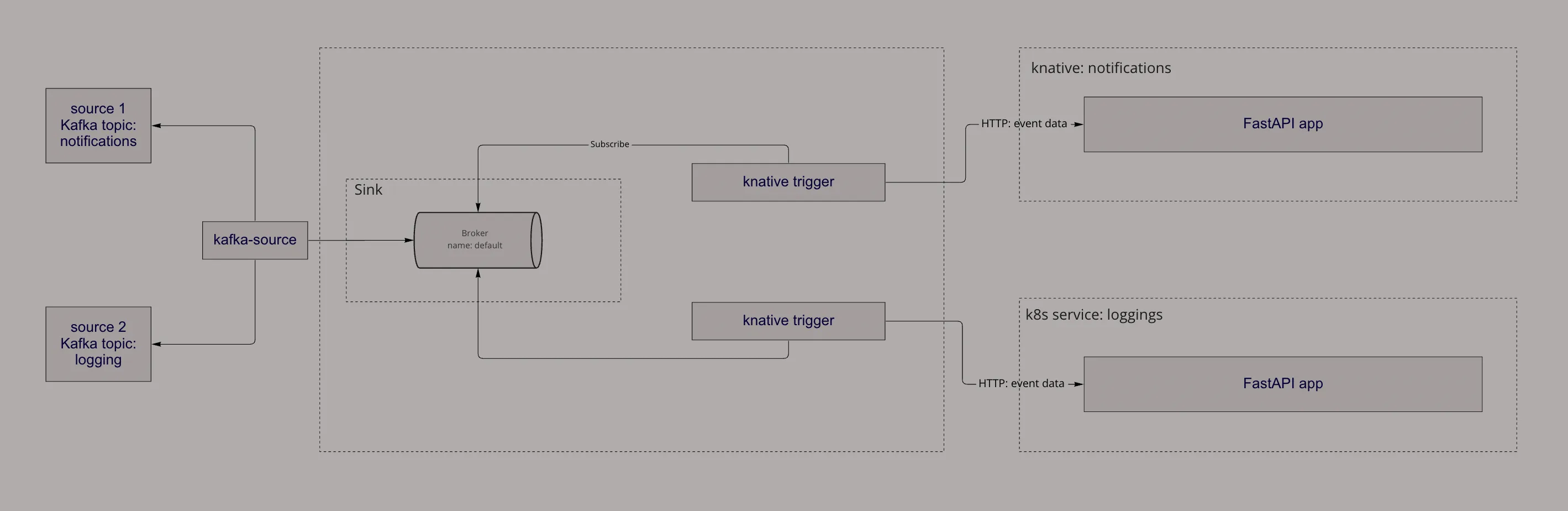
Setup
Knative Serving
Kubernetes resources
-
Install CRDs for serving module:
kubectl apply -f https://github.com/knative/serving/releases/download/knative-v1.7.1/serving-crds.yaml -
Install core serving components:
kubectl apply -f https://github.com/knative/serving/releases/download/knative-v1.7.1/serving-core.yaml -
Install a networking layer (for this case I’m using kourier) - it is required to connect to the kservice:
kubectl apply -f https://github.com/knative/net-kourier/releases/download/knative-v1.7.0/kourier.yaml -
Configure Knative Serving to use Kourier by default by running the command:
kubectl patch configmap/config-network \ --namespace knative-serving \ --type merge \ --patch '{"data":{"ingress-class":"kourier.ingress.networking.knative.dev"}}' -
Verify your External IP:
kubectl --namespace kourier-system get service kourier
Components
-
Knative Service runs a normal web app proces, of course, I’m going to use a simple FastAPI Python application just to log our notifications events:
# main.py import logging from typing import Dict from fastapi import FastAPI, Request app = FastAPI() @app.post("/events/notifications") async def root(request: Request) -> Dict[str, str]: event_data = await request.json() logging.info(event_data) return {"message": "ok"} -
Define a Kubernetes resource for Knative Service:
# my-service.yaml apiVersion: serving.knative.dev/v1 kind: Service metadata: name: my-notifications labels: networking.knative.dev/visibility: cluster-local spec: template: metadata: annotations: autoscaling.knative.dev/max-scale: "3" autoscaling.knative.dev/scale-to-zero: "false" labels: app: my-notifications spec: containers: - name: my-notifications resources: requests: memory: "200Mi" cpu: "200m" limits: memory: "400Mi" cpu: "400m" image: my-notifications-image imagePullPolicy: Always args: [ 'python', 'main.py' ] -
Please pay attention to the labels for
networking.knative.dev/visibilitywhich defines only internal cluster connection. To verify that your networking is internal run command and check it ends withsvc.cluster.local[docs]:kubectl get kservice my-notifications NAME URL LATESTCREATED LATESTREADY READY REASON my-notifications http://my-notifications.default.svc.cluster.local my-notifications-1b2ce my-notifications-1b2ce True -
I also always recommend setting up readiness and aliveness probes for your application which will ping a service. For sake of time, I will skip it here.
-
Apply your configuration into k8s:
kubectl apply -f my-service.yaml -
Verify is server runs:
kubectl logs -l app=my-notifications
Knative Eventing
Kubernetes resources
-
Install CRDs for the eventing module:
kubectl apply -f https://github.com/knative/eventing/releases/download/knative-v1.7.1/eventing-crds.yaml -
Install core eventing components:
kubectl apply -f https://github.com/knative/eventing/releases/download/knative-v1.7.1/eventing-core.yaml -
Install apache Kafka broker (responsible for event routing):
kubectl apply -f https://github.com/knative-sandbox/eventing-kafka-broker/releases/download/knative-v1.7.0/eventing-kafka-controller.yaml
kubectl apply -f https://github.com/knative-sandbox/eventing-kafka-broker/releases/download/knative-v1.7.0/eventing-kafka-broker.yaml
Components
-
The First configuration is a Broker k8s custom resource which defines an event mesh for collecting a pool of events. Our Broker class for Knative is
Kafka.apiVersion: eventing.knative.dev/v1 kind: Broker metadata: annotations: eventing.knative.dev/broker.class: Kafka name: default spec: config: apiVersion: v1 kind: ConfigMap name: kafka-broker-config -
As you may notice above we used a default ConfigMap for definition, we can override the default one or use a new one. The most important is to set a
bootstrap.serversdata, make sure it is the same URL where your Kafka is running:apiVersion: v1 kind: ConfigMap metadata: name: kafka-broker-config namespace: default data: default.topic.partitions: '10' default.topic.replication.factor: '1' bootstrap.servers: '...kafka.svc.cluster.local:29092' -
As mentioned above we also need a
KafkaSourceresource. It will map events from our already built Kafka topics and push them to our broker sink.apiVersion: sources.knative.dev/v1beta1 kind: KafkaSource metadata: name: kafka-source spec: consumerGroup: knative-group bootstrapServers: - ...kafka.svc.cluster.local:29092 # note the kafka namespace topics: - notifications - loggings sink: ref: apiVersion: eventing.knative.dev/v1 kind: Broker name: default -
The final step is to configure a mechanism that will subscribe to the notifications service and push (via HTTP) notification events (only) from a broker:
# triggers.yaml apiVersion: eventing.knative.dev/v1 kind: Trigger metadata: name: notification-trigger spec: broker: default filter: attributes: source: /apis/v1/namespaces/default/kafkasources/kafka-source#notifications subscriber: ref: apiVersion: v1 kind: Service name: my-notifications uri: /events/notifications -
Apply Trigger resource:
kubectl apply -f triggers.yaml -
Verify trigger readiness:
kubectl get Trigger

NAME                            BROKER    SUBSCRIBER_URI                                                                                    AGE     READY   REASON
notification-trigger            default   http://my-notification.default.svc.cluster.local/v1/user-notifications                            0d1h    True
Testing
The best way is to simply produce events for your Kafka topics. They should be pooled into the sink we defined, and then via trigger pushed to the Knative service. Simply check the logs if the event log is displayed.
If you are using Confluent Kafka you can do simple Producer:
import uuid, json
from confluent_kafka import Producer


producer = Producer()
producer.produce(
    topic="notifications",
    value=json.dumps({"message": "test"}),
    key=str(uuid.uuid4()),
)
producer.poll(0)
Then, log your application to see if the event arrived:
kubectl logs -l app=my-notificationsSummary
You can decide if this tool is for you or not. In my opinion, it is a great solution if you need to rapidly develop an application and do not have much time to maintain k8s infrastructure.
It is a great way to introduce “serverless” and maintain it by yourself. Next great future is on-demand infrastructure (auto-scaling) including scale-to-zero, which can save some money especially for startups and hobbyist projects. For sure, it makes life easier it is about deployment and rollouts. Knative out of the box creates Revisions with rolling deployments allowing to split traffic/rollback with 3 lines of code.
I could not cover every feature of knative in this post, but I bet you can try it by yourself. If it is about me, I still want to test some great stuff like Knative Channel/Subscription patter.